Quick answer: how do I log in to BG678?
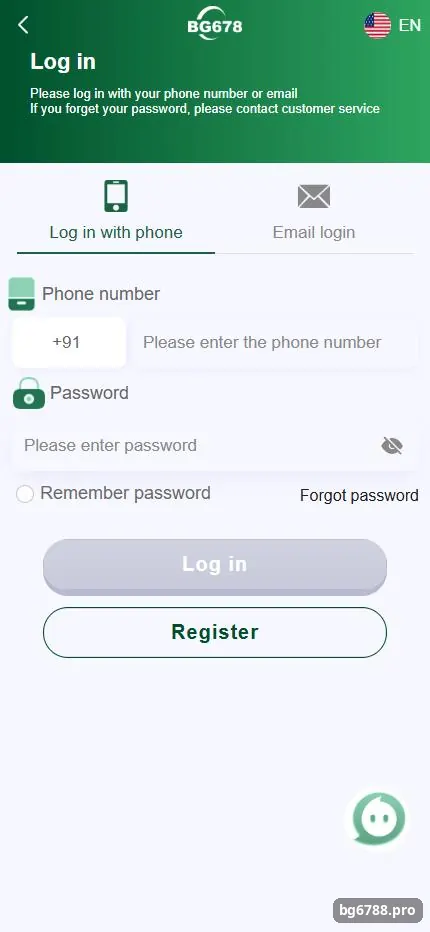
Open the BG678 Log in screen, choose “Log in with phone” (+91 number) or the email tab, type your password and tap Log in. If you forgot the password, tap Forgot password and follow the customer service steps. You need an account first; if you do not have one, register on BG678 in about two minutes.
Step by step
What are the BG678 login steps?
BG678 login uses the same phone number or email and password you chose at sign-up; there is no separate username.
- Open the login page. Tap Log in on this site. It opens the BG678 login screen in a new tab.
- Choose phone login. Stay on “Log in with phone”. The +91 code is already selected.
- Enter your number. Type the 10-digit mobile number you registered with.
- Enter your password. Tap the eye icon to check what you typed.
- Tap Log in. You land on the home screen with your wallet balance at the top.
Other options
Can I log in to BG678 with email instead of phone?
Yes. The login screen has an email tab: switch to it, type the email address you registered with and your password, then tap Log in.
Email login only works if you created the account with email or added an email later. If you signed up with a phone number, use phone login. The Remember password box saves your details on the device; tick it only on a phone nobody else uses.
Recovery
What if I forgot my BG678 password?
Tap Forgot password on the login screen; BG678 sends you to customer service, who verify your account and help you set a new password.
- Tap Forgot password. It is under the password field on the login screen.
- Contact customer service. Follow the prompt and explain that you need a password reset.
- Verify your account. Give the registered phone number and answer the checks support asks for.
- Set a new password. Choose a password you do not use anywhere else and log in again.
Customer service will never ask for your UPI PIN or bank OTP. Anyone on WhatsApp or Telegram asking for them is not BG678 support.
Fixes
Why can’t I log in to BG678?
Most failed logins come from the wrong tab (phone vs email), a typo in the number, an old saved password or a poor connection.
| Message or symptom | Likely cause | Fix |
|---|---|---|
| Wrong password | Typo or old password | Tap the eye icon, retype, or use Forgot password |
| Account not found | Wrong tab or number | Switch phone/email tab and check the 10 digits |
| Page keeps loading | Weak signal or old cache | Switch Wi-Fi/mobile data, clear the browser cache |
| App logs you out | Outdated APK | Download the latest app from the Install APP button |
| Fake login page | Link from an unknown group | Only use the button on this site or inside your app |
Security
How do I keep my BG678 account safe?
- Use a unique password of at least 8 characters with letters and numbers.
- Do not tick Remember password on a shared or borrowed phone.
- Log out after playing on someone else’s device.
- Never share SMS codes; BG678 staff will not ask for them.
- Keep your withdrawal bank account or UPI ID in your own name.
For everything else about the platform, return to our BG678 Game overview.
FAQ
BG678 login FAQ
Is the BG678 login the same on the app and the website?
Yes. The Android app and the mobile website use the same account, password and wallet.
Do I need an OTP every time I log in?
No. The SMS code is used when you register. Normal login needs only your phone number or email and password.
Can I change my BG678 password after logging in?
Yes, from the Account section settings. If you cannot find the option, ask customer service.
Can I have two BG678 accounts?
Platforms like this usually allow one account per person, phone number and payment account. Extra accounts can be blocked and bonuses cancelled.
What if my phone number changed?
Contact customer service from inside the app before you lose access to the old number, so they can verify you.
Can this website reset my password?
No. bg6788.pro is an independent guide and has no access to BG678 accounts. Only BG678 customer service can help.
Key takeaways
- Log in with your +91 phone number or email plus password.
- Forgot password leads to BG678 customer service for a reset.
- Never share passwords or SMS codes with anyone.
- Next steps: make a deposit or install the app.